Menus
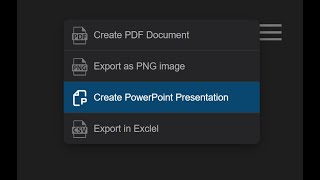

Use built-in menus to quickly access actions like adding, editing, or removing nodes, making chart management fast and intuitive.
OrgChart has these menus
- menu – top right corner
- nodeMenu – button inside the node
- nodeContextMenu – right-click menu
- nodeCircleMenu – circular node menu
menu
This is the main (hamburger) menu of the chart.
javascript
menu: {
    pdf_export: { text: "Export PDF" },
    png_export: { text: "Export PNG" },
    svg_export: { text: "Export SVG" },
    csv_export: { text: "Export CSV" },
    pp_preview: { text: "Create PowerPoint Presentation" },
    pp_export: { text: "Export to PowerPoint" }
},
Predefined menu items
(Same as controls)
- svg_export – Export to SVG
- pdf_export – Export to PDF
- png_export – Export to PNG
- visio_export – Export to Visio (VSDX)
- pp_export – Export to PowerPoint (PPTX)
- pp_preview – PPTX preview
- pdf_preview – PDF preview
- svg_preview – SVG preview
- png_preview – PNG preview
- csv_export – Export to CSV
- xml_export – Export to XML
- json_export – Export to JSON
- fit – Fit chart to screen
- expand_all – Expand all nodes
- full_screen – Toggle fullscreen
- zoom_in – Zoom in
- zoom_out – Zoom out
- layout_mixed – Mixed layout
- layout_normal – Normal layout
- layout_right_offset – Right offset layout
- layout_left_offset – Left offset layout
- layout_tree – Tree layout
- layout_grid – Grid layout
Node Menu
This menu opens from the node button.
javascript
nodeMenu: {
    details: { text: "Details" },
    edit: { text: "Edit" },
    add: { text: "Add" },
    remove: { text: "Remove" }
},Node Context Menu
Opens on right-click.
javascript
nodeContextMenu: {
    edit: { text: "Edit", icon: OrgChart.icon.edit(18, 18, '#039BE5') },
},Predefined nodeMenu (context/circle) items
- add - add a node
- remove - remove the node
- edit - edit the node
- details - open details for the node
- svg_export – Export to SVG
- pdf_export – Export to PDF
- png_export – Export to PNG
- visio_export – Export to Visio (VSDX)
- pp_export – Export to PowerPoint (PPTX)
- pp_preview – PPTX preview
- pdf_preview – PDF preview
- svg_preview – SVG preview
- png_preview – PNG preview
- csv_export – Export to CSV
- xml_export – Export to XML
- json_export – Export to JSON
- expand_all – Expand all nodes
Node Menu Devider
Use devider: true to render a divider after a menu item.
javascript
nodeMenu: {
    add: { text: "Add new" },
    details: { text: "Details", devider: true }
},
Node Menu Width
Set a minimum width for the node menu:
css
div.boc-menu {
    min-width: 300px;
}
If the menu contains longer text that exceeds 300px, the width automatically expands to fit the content.
If you want the menu width to always remain 300px, even when the content is longer, use:
css
div.boc-menu {
    width: 300px;
}
Node Menu Submenu
Use subMenu to create nested menu levels inside a node menu item.
javascript
nodeMenu: {
    exports: {
        text: "Save as",
        subMenu: {
            pdf: { text: "PDF" },
            png: { text: "PNG" },
            aaa: {
                text: "AAA",
                subMenu: {
                    bbb: { text: "BBB" },
                    ccc: {
                        text: "CCC",
                        subMenu: {
                            add: { text: "Add new" }
                        }
                    }
                }
            }
        }
    }
},Custom node menu item
javascript
let webcallMeIcon = `<svg width="24" height="24">...</svg>`;javascript
nodeMenu: {
    call: {
        icon: webcallMeIcon,
        text: "Call now",
        onClick: callHandler
    }
},
javascript
function callHandler(nodeId) {
    let nodeData = chart.get(nodeId);
    let employeeName = nodeData["name"];
    window.open(
        'https://webcall.me/' + employeeName,
        employeeName,
        'width=340px,height=670px'
    );
}Override node menu using tags
javascript
nodeMenu: {
    pdf: { text: "Export To Pdf" }
}
javascript
tags: {
    overrideMenu: {
        nodeMenu: {
            edit: { text: "Edit" }
        }
    }
}
javascript
{ id: 2, pid: 1, tags: ["overrideMenu"] }Override menus with on show
javascript
chart.nodeMenuUI.on('show', function(sender, args){
    args.menu = {
        myMenuItem: {
            text: "My Text",
            icon: OrgChart.icon.add(16,16,"#ccc"),
            onClick: function(id){ alert(id) }
        }
    }
});

chart.menuUI.on('show', function(sender, args){
    args.menu = { ...args.menu }
});

chart.nodeContextMenuUI.on('show', function(sender, args){
    args.menu = { ...args.menu }
});Custom icons
Node Circle Menu
1) Define button
javascript
OrgChart.templates.ana.nodeCircleMenuButton = {
    radius: 18,
    x: 250,
    y: 60,
    color: '#fff',
    stroke: '#aeaeae'
};
2) Configure menu
javascript
nodeCircleMenu: {
    addNode: {
        icon: OrgChart.icon.add(24, 24, '#aeaeae'),
        text: "Add node",
        color: "white"
    },
    editNode: {
        icon: OrgChart.icon.edit(24, 24, '#aeaeae'),
        text: "Edit node",
        color: "white"
    },
    addClink: {
        icon: OrgChart.icon.link(24, 24, '#aeaeae'),
        text: "Add C link",
        color: '#fff',
        draggable: true
    }
}
3) Show event
javascript
chart.nodeCircleMenuUI.on('show', function (sender, args){
    let node = chart.getNode(args.nodeId);
    if (args.menu.delete) delete args.menu.delete;

    if (node.parent) {
        args.menu.delete = {
            icon: OrgChart.icon.remove(24, 24, '#aeaeae'),
            text: "Remove node",
            color: "white"
        };
    }
});
4) Events
javascript
chart.nodeCircleMenuUI.on('click', function (sender, args) {
    switch (args.menuItem.text) {
        case "Add node":
            let id = chart.generateId();
            chart.addNode({ id: id, pid: args.nodeId });
            break;
        case "Edit node":
            chart.editUI.show(args.nodeId);
            break;
        case "Remove node":
            chart.removeNode(args.nodeId);
            break;
    }
});
javascript
chart.nodeCircleMenuUI.on('drop', function (sender, args) {
    chart.addClink(args.from, args.to).draw(OrgChart.action.update);
});
javascript
chart.nodeCircleMenuUI.on('mouseenter', function (sender, args) {
    if (args.menuItem.text == "Remove node") {
        document.querySelector('[data-n-id="' + args.from + '"]').style.opacity = 0.5;
    }
});
javascript
chart.nodeCircleMenuUI.on('mouseout', function (sender, args) {
    document.querySelector('[data-n-id="' + args.from + '"]').style.opacity = 1;
});Custom node circle menu via tags
javascript
tags:{
    overrideMenu:{
        nodeCircleMenu: {
            addNode: {
                icon: OrgChart.icon.add(24, 24, '#aeaeae'),
                text: "Add node",
                color: "white"
            },
            editNode: {
                icon: OrgChart.icon.edit(24, 24, '#aeaeae'),
                text: "Edit node",
                color: "white"
            },
            editNode1: {
                icon: OrgChart.icon.edit(24, 24, '#F57C00'),
                text: "Edit node 1",
                color: "white"
            },
            addClink: {
                icon: OrgChart.icon.link(24, 24, '#aeaeae'),
                text: "Add C link",
                color: '#fff',
                draggable: true
            }
        }
    }
}