Improved Slink Positioning in OrgChart JS
What Changed in Version 9.01.01
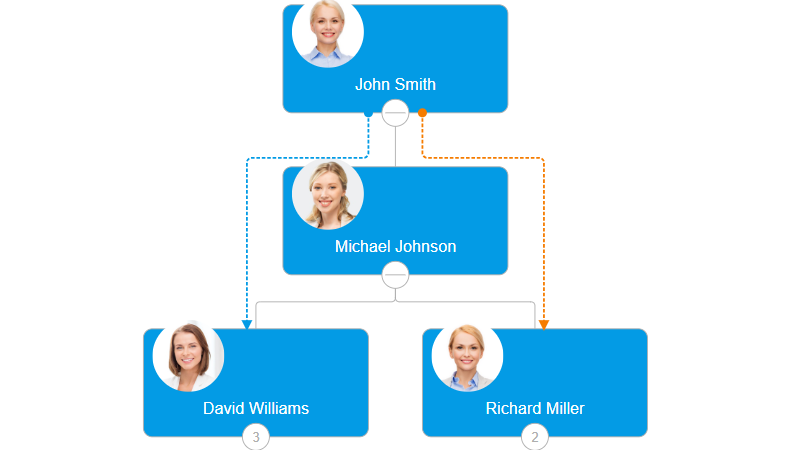
OrgChart JS version 9.01.01 ships with a meaningful quality-of-life improvement: slinks no longer overlap. When multiple slinks connect nearby nodes, the engine now automatically calculates optimal spacing and routing so every connection remains distinct and legible.
The Problem It Solves
Slinks—the secondary, curved connections that represent relationships outside the standard hierarchy—are a powerful way to visualize cross-team reporting, mentorship, advisory roles, or any non-hierarchical relationship in your org chart.
However, in complex charts with many slinks connecting nearby nodes, these connections would stack on top of each other. The result was a tangled mess of overlapping lines that was difficult to follow and visually unprofessional. Users had to zoom in or hover over lines just to distinguish individual connections.
Smarter Automatic Routing
The improved positioning algorithm detects when multiple slinks run between adjacent nodes and intelligently redistributes them:
- No overlapping lines – Each slink is given its own distinct path and visual space
- Cleaner diagrams – The overall chart remains organized even when many secondary relationships exist
- Better readability in complex charts – Users can follow individual slink paths at a glance, without zooming or guesswork
The routing adapts dynamically as the chart changes—whether nodes are expanded, collapsed, or repositioned.
Zero Configuration Required
This improvement is fully automatic. No new options to set, no migration needed. Simply update to version 9.01.01 and your existing slinks will immediately benefit from improved positioning.
If you are already using slinks in your charts, the upgrade delivers a noticeably cleaner visual experience with no code changes on your end.
See It in Action
Explore the live demo to see how multiple slinks are now cleanly separated and routed:
Live Demo – Improved Slink Positioning
Related Documentation
Want to learn more about slinks and how to use them in your organizational charts? Visit the Slink documentation for a full overview of configuration options, styling, and use cases.