OrgScribe
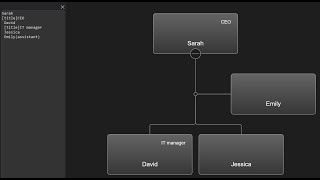

OrgScribe is like Markdown for org charts.
You can create your org chart by writing node data in a list.
We add each node on a new line, and to show hierarchy, we use indentation or another symbol as an offset.

The node name becomes the value of the name field.
Adding OrgScribe
To open OrgScribe UI:
javascript
document.getElementById("btn").addEventListener("click", function () {
    chart.orgscribeUI.show();
});Node data
To add node data, write the field name in square brackets under the node name:
text
Denny Curtis
[title] CEO
 Ashley Barnett
 [title] Sales Manager
 Caden Ellison
 [title] Dev Manager
Editing
Editing the data in the Edit Form updates the OrgScribe data:
Node tags
You can add tags in parentheses next to the node name.
Example CSS:
css
.node.yellow rect {
    fill: #FFCA28;
}
OrgScribe example:
text
Denny Curtis
Ashley Barnett (yellow)Offset symbol
Use the ORGSCRIBE_OFFSET constant to change the offset symbol:
javascript
OrgChart.ORGSCRIBE_OFFSET = "#";